
Bramvia — Business Central Experts
Manual accounts payable costs $12-15 per invoice once you count keying, matching, approval chasing, duplicates and late-payment fees. What an AI-assisted AP process looks like in 2026 — capture, three-way match, agent-proposed postings, human approval — and the honest ROI for a company processing 500-2,000 invoices a month.
Short answer: a vendor invoice that is opened, keyed, matched to a purchase order by eye, emailed to someone for approval, chased, and finally paid costs a mid-market company somewhere between $12 and $15 all-in — and that's before the ones that get paid twice, paid late, or paid at the wrong amount. At 800 invoices a month that is $10,000-12,000 a month of process cost hiding inside "accounting". The replacement exists and it is not exotic: invoices captured from email, matched automatically to the order and the receipt, an AI agent that proposes the posting and a person who approves it, and payment runs that don't depend on who is in the office. In Business Central the payables agent ships with the product and is billed by what it processes — no new platform. The honest version: the technology is the easy half. The hard half is having purchase orders in the system in the first place.
Next step: see how many hours this frees for your team in the AI hours calculator.
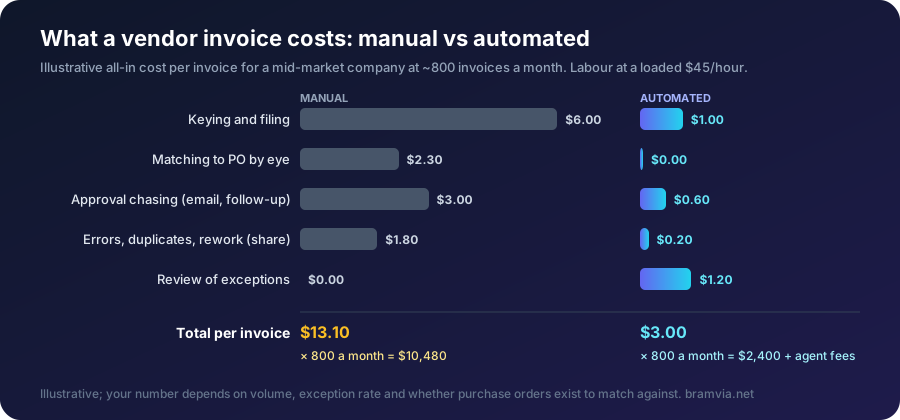
What manual AP actually costs
The keying is the visible part. The expensive parts are invisible:
| Hidden cost | What it looks like | Typical impact |
|---|---|---|
| Duplicate payments | Same invoice, two emails, two people | 0.5-1% of AP spend, and you rarely get it back |
| Early-payment discounts missed | 2/10 net 30 that nobody captures because approval took 12 days | 2% on whatever you could have taken |
| Late fees and damaged terms | Vendors put you on prepay after two late months | Cash and relationship |
| Wrong amounts approved | Price on the invoice ≠ price on the PO, nobody compared | Margin leak nobody can see |
| Month-end accrual guesswork | Invoices sitting in inboxes, not in the system | Slow close, inaccurate P&L |
| Talent | Your best accountant spends her week typing | She leaves |
Add the labour: a clerk handling 800 invoices a month at even 8 minutes each is 107 hours — most of a full-time person doing work a system does better.
What the 2026 process looks like
1. Capture. Invoices arrive by email to one address. The system reads them — PDF or image — and extracts vendor, number, date, lines, amounts. No keying. In Business Central this is the E-Documents framework; on PDFs it uses AI reading, on structured formats (Peppol, EDI) it's exact.
2. Match. (What three-way match is, in detail.) The invoice is compared to the purchase order and the receipt: quantities, prices, dates. Three-way matching. Anything that matches within tolerance flows through; anything that doesn't gets flagged with the specific mismatch — "price on line 3 is $4.20, PO says $3.90."
3. Propose. This is where the agent earns its keep. Business Central's Payables Agent takes the matched invoice, proposes the posting (vendor, GL accounts, dimensions, due date), and puts it in a review queue. Version 29 improved this to match on line amounts and expected receipt dates, and to finalise drafts according to your receive-on-invoice setup.
4. Approve. A person looks at the proposal — in the system, not in an email thread — and approves or corrects. The agent learns from corrections. The audit trail is a by-product.
5. Pay. Payment runs by due date and discount date, with bank files generated, not typed.
The critical design decision is step 4. The agent proposes; a human approves. That is what makes it trustworthy to an auditor and to your controller, and it is configuration, not extra work.
The part vendors don't emphasise
None of this works without purchase orders in the system. If your team buys by phone and the invoice is the first record of the purchase, there is nothing to match against — the agent can capture and propose, but it cannot verify. Companies that skip this step buy AP automation and get a faster way to approve unverified invoices.
So the sequence is: purchasing discipline first (POs for anything above a threshold), then capture, then matching, then the agent. In most mid-market companies that is a six-to-eight-week project, and the purchasing part is the part that takes the time.
The honest ROI
For a company processing 800 invoices a month:
- Labour: from ~107 hours to ~20 hours of review a month. Roughly 85 hours back, every month.
- Duplicates and errors: from ~0.5-1% of AP spend to near zero — on $1M a month of purchases, $5,000-10,000.
- Discounts captured: whatever your vendors offer that you currently miss. Often the largest line.
- Cost of the agent: consumption-billed, typically a fraction of a dollar per invoice.
Payback is usually measured in weeks, not years — provided the PO discipline exists. Without it, the number is much smaller and we would tell you so.
How we do it
We set up capture, matching and the agent on Business Central as one part of a project, invoiced only after you accept it. If you are not on Business Central, the same process exists on most modern ERPs and the Profit Leak Audit will tell you what your AP is costing before you decide anything. And if the finding is "your problem is purchasing, not AP", that is the finding.
The formulas we use
Cost per invoice, all-in
Cost per invoice = (Minutes per invoice ÷ 60 × Loaded hourly rate) + (Error and duplicate cost ÷ Invoice count)
Minutes per invoice = keying + matching + approval chasing + filing
Example: 15 minutes × $45/hour = $11.25, plus $1,440 a month of duplicates and rework ÷ 800 invoices = $1.80 → $13.05 per invoice, $10,440 a month. Automated: 3-4 minutes of review on exceptions only → about $3.
Duplicate-payment exposure
Annual duplicate exposure = Annual AP spend × Duplicate rate
Typical unmanaged duplicate rate: 0.5-1%. On $12M of annual purchases that is $60,000-120,000, most of it never recovered.
Early-payment discount, annualised
Annualised return of taking 2/10 net 30 = (Discount ÷ (1 − Discount)) × (365 ÷ (Full term − Discount days))
                                        = (0.02 ÷ 0.98) × (365 ÷ 20) ≈ 37% a year
Value missed = Eligible spend × Discount %
A discount you miss because approval took 12 days is a 37% annual return you declined. If $3M of spend carries 2/10 terms and you capture none, that is $60,000 a year.
Payback of the automation
Monthly saving = (Manual cost per invoice − Automated cost per invoice) × Monthly invoices + Duplicates avoided + Discounts captured
Payback (months) = Implementation cost ÷ Monthly saving
FAQ
Will the agent post invoices without anyone looking? Only if you configure it that way. We don't recommend it and neither does Microsoft. Propose-and-approve is the default we set up.
What about invoices with no PO — utilities, rent, subscriptions? Recurring invoices are handled by templates and vendor rules, not by matching. They are the minority and the easy part.
Our vendors send paper. Scan to the same inbox. Paper is slower, not blocked.
Does this replace our AP clerk? It replaces the keying. What it leaves is review, exceptions and vendor relationships — which is what a good AP person should be doing anyway.
Free assessment · Evaluación gratuita
Tell us your current system and how many users you have. First reply within one working day. / Cuéntanos tu sistema actual y cuántos usuarios sois. Respondemos en un día laborable.
Want to know what your AP actually costs per invoice? Free assessment, no commitment — first reply within one working day.
Bramvia in: Spain · United States · Mexico · United Kingdom · Ireland · Canada · Colombia · Argentina · Chile · Peru · Australia · New Zealand · South Africa · Philippines · Poland · MCP server · Safety stock calculator