
Bramvia — Business Central Experts
Migrating from Dynamics NAV to Business Central in the US: $25,000-45,000 for a small company with few customizations, $45,000-100,000 mid-market, $100,000-200,000+ for heavy C/AL and multi-entity. The five cost drivers, the hidden ones, Bridge to Cloud 3 (30% off licenses), and how to bring the number down without cutting scope.
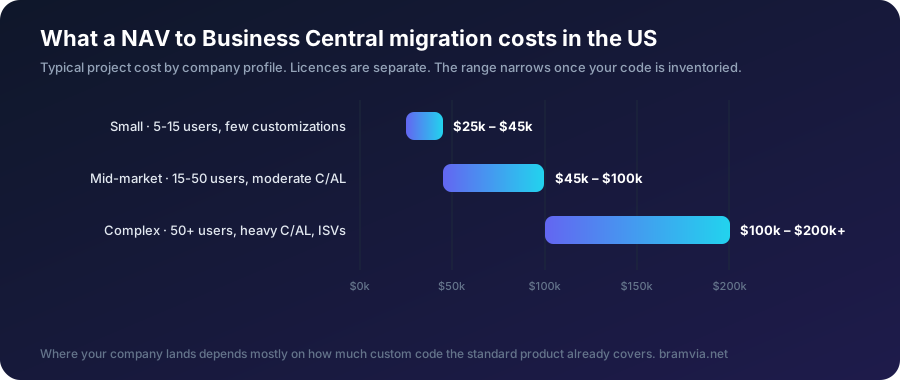
Short answer: a Dynamics NAV to Business Central migration in the US typically costs $25,000-45,000 for a small company (5-15 users, few customizations, clean data), $45,000-100,000 for a mid-market company (15-50 users, moderate C/AL code, one or two integrations, maybe several entities), and $100,000-200,000+ where there is heavy legacy code to rewrite, multiple ISV add-ons and multiple integrations. On top: licenses at $80 (Essentials) or $110 (Premium) per full user per month, and $8 for Team Members — minus 30% for three years if you qualify for Microsoft's Bridge to Cloud 3 (enrollment through December 31, 2027). There is no fixed price because the biggest driver isn't the software: it is how much of your custom C/AL code actually needs to be rewritten — and in most NAV systems, a third to half of it doesn't. All figures in this guide are US dollars and typical ranges, not quotes. Canadian projects sit in similar ranges in CAD terms; the Canadian localization (GST/HST/PST, bilingual documents) is Microsoft's own.
Next step: price your own users with the licence calculator below, see our fixed prices per phase, or get a written estimate in a free 30-minute assessment.
Sound familiar?
- Your NAV partner quoted a number, and you have no idea whether it's fair.
- Nobody can tell you how much of fifteen years of customizations you actually still need.
- You've heard about Bridge to Cloud discounts but don't know if you qualify.
- Finance wants a budget line this quarter, and "it depends" isn't one.
If two or more ring true, this is written for you. At the end, we explain how we'd solve it.
Average migration cost by company size
| Profile | Typical project cost | What's inside |
|---|---|---|
| Small (5-15 users, standard processes, few customizations) | $25,000-45,000 | Object inventory, configuration, masters and balances migrated, training, go-live |
| Mid-market (15-50 users, moderate C/AL, 1-2 integrations, possibly multi-entity) | $45,000-100,000 | Plus C/AL → AL rewrite of what's still needed, integrations rebuilt on APIs, warehouse or manufacturing setup |
| Complex (50+ users, heavy C/AL, several ISVs, multiple integrations, multi-entity) | $100,000-200,000+ | Plus ISV replacement or upgrade, EDI/WMS/e-commerce integrations, phased go-live per entity |
Your project cost is one-off. Licenses are recurring: a 25-user company on Essentials pays about $24,000 a year at list — about $16,800 with BTC3 — and most companies discover that 30-50% of "users" only need an $8 Team Member license once roles are counted properly.
The 5 core drivers
1. Licensing model — and right-sizing. Essentials vs Premium is a $30-per-user-per-month decision with no functional upside unless you manufacture or run field service. Full user vs Team Member is an $80 vs $8 decision. Get the role list before the quote.
2. Data migration and cleanup. Masters (customers, vendors, items, chart of accounts), open documents and opening balances migrate. History is archived, not migrated. Migrating ten years of transactions can double this line and adds nothing your auditor can't get from a read-only NAV. Dirty data (duplicates, dead SKUs, three addresses per customer) is the other multiplier — cleaning it before the project is the cheapest hour you'll spend.
3. Customization refactoring: C/AL → AL. The single biggest variable. NAV customizations modified the base code; Business Central requires extensions that hook into the standard through events. Every object must be inventoried: does the standard now cover it? Is there an AppSource app? Or does it need an AL extension? In a NAV with years behind it, a third to half of the custom code is obsolete. A partner who quotes "rewrite everything" is quoting work you don't need.
4. Third-party apps (ISVs). Old add-ons (EDI, payroll connectors, warehouse tools) either have a Business Central version on AppSource, a modern replacement, or must be rebuilt. Each one is a line — and each one has its own subscription going forward.
5. Training and change management. Cut first in bad quotes, paid for later in adoption. Role-based training with your real data, not demo data. Budget 5-10% of the project.
Hidden costs that blow ERP budgets
- Data cleanup done during the project instead of before it — billed at consulting rates.
- Scope creep from an undefined scope. "Migrate to Business Central" is not a scope. Parts with written acceptance criteria are.
- Integrations "to be determined" — determined late, in change orders.
- Downtime from an unplanned cutover. A weekend go-live with NAV read-only as fallback costs almost nothing; a botched one costs a week of operations.
- Testing with demo data. Problems then surface at the first real month-end.
- Hours without deliverables. A block of hours is not a scope.
Microsoft's incentive: Bridge to Cloud 3
For NAV customers with an active Enhancement Plan or subscription: 30% off Business Central Online for a fixed three-year term, enrollment January 1, 2026 – December 31, 2027, plus "$0 users" allocated on the value of your Enhancement Plan (requested annually, up to two years), and dual access rights to run NAV and Business Central side by side during the migration. Enrolled through a CSP partner only. The three-year term is non-cancellable, and it discounts licenses — not the project. Still, on a 25-user company it's worth roughly $7,000 a year. Full end-of-life timeline and BTC3 detail.
How to bring the cost down without cutting scope
- Standard first. Every customization that the standard now covers is deleted, not rewritten. Insist on the inventory that marks each object standard / app / extension.
- Archive history. Migrate what runs the business; keep NAV read-only for the rest.
- Right-size licenses. Role list before the quote. Essentials unless you manufacture.
- Phase it. Finance, sales, purchasing first; warehouse, manufacturing, agents later. Spreads cost and risk.
- Use AI in the project itself. We use AI to read legacy C/AL, map it to standard, clean data and generate tests from your real documents — 35-40% fewer consultant hours for the same scope. That is why a European team can quote below a US partner working by hand.
- Pay on acceptance. Each part invoiced only after you accept it. It aligns everyone's incentive with finishing.
What a partner must analyze before quoting
If a quote arrives without these, it's a guess:
- Object inventory with the standard / app / extension classification
- Data volume and quality assessment (duplicates, orphans, years to archive)
- Integration list with the rebuild pattern for each (API, webhook, connector)
- ISV inventory with the AppSource status of each
- Role-by-role license count
- Cutover plan with fallback
Already have a quote? We'll review it line by line within 48 hours — and tell you in writing if it's good.
How we help you solve it
- Inventory every custom object in your NAV and classify it: covered by the standard product, still needed, or obsolete. This is where the price is decided.
- Check your data: what migrates, what is archived, and what needs cleaning first.
- Quote in phases, with a range narrowed to your code, not an industry average.
Right now we are migrating a 500-person waste-management company from NAV 2009 R2 to Business Central online. Each part is invoiced only after you accept it.
FAQ
How much does it cost to upgrade from Dynamics NAV to Business Central? In the US, typically $25,000-45,000 for a small company with few customizations, $45,000-100,000 for mid-market with moderate C/AL code and one or two integrations, and $100,000-200,000+ with heavy legacy code and several entities. Licenses come on top, from $80 per full user per month, 30% less for three years under Bridge to Cloud 3 if you qualify.
Is migration cheaper than a NAV upgrade? They cost about the same. The upgrade buys a few years and none of the cloud; the migration is done once. The comparison.
What about NAV 2009 or 2013? Same one-project jump; more C/AL to inventory. We're running a NAV 2009 R2 migration right now.
Does the price include US sales tax setup? The standard localization is included; the Avalara (or Vertex) integration is a separate line if your nexus complexity needs it — we configure and integrate it ourselves.
Why would a US company use a European partner? Capacity, cost and the overnight cycle — with a two-year US client reference available under NDA.
Free assessment · Evaluación gratuita
Tell us your current system and how many users you have. First reply within one working day. / Cuéntanos tu sistema actual y cuántos usuarios sois. Respondemos en un día laborable.
Send us your NAV version and number of users. Within five working days you'll have a cost range for your company, not an average. Request the assessment.
Bramvia in: Spain · United States · Mexico · United Kingdom · Ireland · Canada · Colombia · Argentina · Chile · Peru · Australia · New Zealand · South Africa · Philippines · Poland · MCP server · Safety stock calculator