
Bramvia — Business Central Experts
Thinking about a NAV upgrade? It costs about the same as a migration to Business Central cloud, buys a few years, and brings none of the cloud: no Copilot, no agents, no automatic updates. The numbers, the cases where on-premises still makes sense, and how to decide over five years.
Every few years, a company running on-premise Dynamics NAV reaches the same fork: upgrade again, or move to the cloud. The upgrade feels like the safer, cheaper option. It's worth examining that assumption, because it usually doesn't survive contact with the numbers.
Sound familiar?
- You're on NAV on-premises and your partner is proposing an upgrade.
- Your version has already lost support, or is about to.
- The server, SQL Server and Windows it runs on are ageing too.
- You're not sure whether upgrading buys you time or just postpones the same decision.
If two or more ring true, this is written for you. At the end, we explain how we'd solve it.
What an on-premise upgrade actually buys
A NAV upgrade is a project: re-testing customizations, migrating data, retraining users, coordinating downtime, and paying for server infrastructure. The cost lands somewhere in the range of a migration — sometimes higher, if your customizations are old and undocumented.
What you get for it: a supported version, for a few more years.
What you don't get: Copilot, autonomous agents, automatic updates, or any of the capability that only exists in the cloud version. And in three or four years, the same decision returns, with the same bill.
That's the part that changes the maths. You're not comparing "cheap upgrade versus expensive migration." You're comparing "an upgrade you'll repeat indefinitely" against "a migration you do once."
The pressures stacking up
Three things are pushing companies off the upgrade treadmill at the same time.
Support timelines. Older NAV versions have already passed their support dates. Running unsupported means no security patches and no regulatory or tax updates — a compliance problem that grows quietly until it doesn't.
Talent. The number of consultants who know NAV's C/AL codebase shrinks every year as they move to AL and cloud work. Finding someone to maintain a 2013 installation is harder and costlier than it was, and that curve only goes one way.
The widening capability gap. Cloud Business Central gains features continuously. On-premise doesn't. Every year you stay, the eventual migration involves a longer jump.
The honest case for staying on-premise
There are real reasons, and we won't pretend otherwise:
- Strict data residency requirements that mandate local hosting
- Very low-latency needs tied to local machinery
- Specific contractual or regulatory constraints
If one of those applies to you, on-premise or hybrid may genuinely be right. The trade-off is that you own the maintenance and forgo the AI.
If none applies, the upgrade is usually deferring a decision rather than making one.
When your version loses support
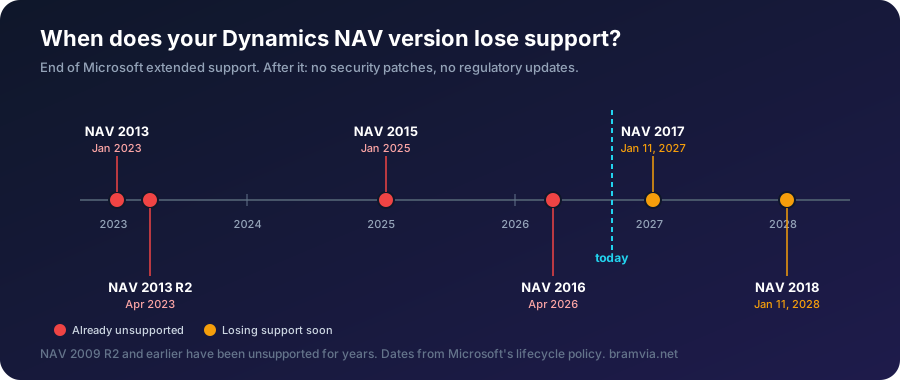
NAV 2016 and earlier no longer receive security patches or regulatory updates from Microsoft. NAV 2017 loses them on January 11, 2027, and NAV 2018 on January 11, 2028. The system keeps running; what changes is that every problem and every new regulation becomes custom work, or doesn't get done.
Upgrade, migrate or stay: the three options
| Option | What it means | Cost | When it makes sense |
|---|---|---|---|
| Stay on NAV with partner support | Fixes and regulatory changes built by hand | Support fee plus each change | A one-to-two-year horizon, a stable system and an exit plan |
| Upgrade to a newer on-premises version | A technical jump to the same server model | A technical project with no process improvement | Rarely: the new version also loses support eventually |
| Migrate to Business Central online | Two updates a year, regulatory changes included, no server | From about $25,000, depending on custom code (ranges) | The stable long-term option |
How to decide without guessing
Get the real numbers: what your last upgrade cost, what your current maintenance and infrastructure cost annually, and what a migration would cost. Compare over five years, not one.
Tell us your NAV version. We'll tell you your real deadline and the cheapest way through it. Request the assessment.
How we help you solve it
- We tell you your real deadline, for your exact version and infrastructure.
- We compare upgrade and migration costs for your code, not in general.
- If the cloud isn't right for you yet, we say so, and keep NAV stable while you prepare.
Right now we are migrating a 500-person waste-management company from NAV 2009 R2 to Business Central online. Each part is invoiced only after you accept it.
FAQ
Is a NAV upgrade cheaper than migrating? They typically cost about the same. The upgrade buys a few years and none of the cloud capabilities; the migration is done once.
Can I upgrade NAV now and migrate later? Yes, but you pay for two projects. It only makes sense if a hard requirement blocks the cloud today.
Free assessment · Evaluación gratuita
Tell us your current system and how many users you have. First reply within one working day. / Cuéntanos tu sistema actual y cuántos usuarios sois. Respondemos en un día laborable.
Bramvia in: Spain · United States · Mexico · United Kingdom · Ireland · Canada · Colombia · Argentina · Chile · Peru · Australia · New Zealand · South Africa · Philippines · Poland · MCP server · Safety stock calculator