
Bramvia — Business Central Experts
NAV 2017 support ends January 2027, NAV 2018 in January 2028, and on April 30, 2031 Microsoft stops selling and renewing NAV licenses entirely. What each date means, what actually breaks, the Bridge to Cloud 3 discount (30% through 2027), and how a US company plans the move without panic.
Short answer: Dynamics NAV, still called Navision by many of its users, is reaching the end of its life on two separate timelines. Support: NAV 2016 lost extended support in April 2026; NAV 2017 loses it on January 11, 2027; NAV 2018 — the last version ever released — on January 11, 2028. After that, no NAV version receives security patches, tax updates or Microsoft support. Licensing: on April 30, 2031, Microsoft ends the sale of NAV — no more Service Plan renewals, no subscription renewals, no additional perpetual users. Your system will not switch off on either date. What ends is protection, compliance updates and your ability to grow or stay licensed. The successor is Dynamics 365 Business Central, and Microsoft is paying you to move: Bridge to Cloud 3 gives qualifying NAV customers 30% off Business Central Online licenses for enrollments through December 31, 2027. For most US NAV customers, the rational window is the next 12-24 months — not because 2031 is close, but because the discount, the consultant supply and the compliance risk all point the same way.
Next step: estimate what your move would take with the migration planner below, check your current system with the free ERP health check, or book a free 30-minute assessment.
What "end of life" actually means
Two terms get mixed up, and the difference matters for your risk register:
- End of support (per version): Microsoft stops shipping security patches, regulatory updates and hotfixes. Mainstream support ended years ago for every NAV version; extended support is what's running out now. The software keeps running — unprotected.
- End of sale (the product): from April 30, 2031, you cannot renew your Enhancement or Advantage Plan, cannot renew subscription licenses, cannot add perpetual users to an existing deployment, and subscription use through SPLA is expected to end. You keep what you have; you can't extend it.
Most NAV installations in the US are on 2013-2018. Every one of them is already past mainstream support; the 2027 and 2028 dates close the last doors.
The timeline
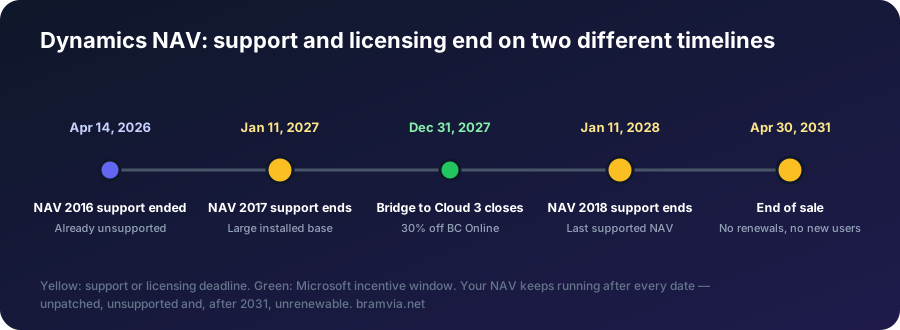
| Date | What happens | Who it affects |
|---|---|---|
| April 14, 2026 | NAV 2016 extended support ended | Already unsupported |
| January 11, 2027 | NAV 2017 extended support ends | One of the largest installed bases |
| January 11, 2028 | NAV 2018 extended support ends — the last supported NAV | Everyone still on NAV |
| December 31, 2027 | Bridge to Cloud 3 enrollment closes | Anyone who wants the 30% discount |
| April 30, 2031 | End of sale: no renewals, no new users | All remaining NAV licensees |
What breaks — and what quietly gets worse
Security. No patches on a system that holds your ledger, your customer data and, often, your bank connections. Cyber insurers increasingly ask about unsupported software; some carriers price it, some exclude it.
Compliance. Sales tax rules (US) and GST/HST/PST (Canada), 1099 and T4A reporting, payroll interfaces — updates stop. What used to arrive as a patch becomes custom work on a dead platform.
People. The consultants who know C/AL are retiring or have moved to AL. Every year the pool shrinks and the hourly rate rises. "Our guy who knows NAV" is a single point of failure with a retirement date.
Capability. Copilot, AI agents for payables and sales orders, Power BI included, automatic updates — all cloud-only. Competitors on Business Central produce the same output with fewer hours. What operating without AI costs a company, with data.
Cost. Servers, SQL licenses, backups, VPNs, upgrade projects every few years. The "cheap because it's paid for" NAV is rarely cheap once you count the infrastructure and the hours around it.
Bridge to Cloud 3: the incentive, and its fine print
Microsoft's current promotion for on-premises Dynamics customers:
- 30% discount on Business Central Online list prices, fixed for a three-year term.
- Enrollment window: January 1, 2026 – December 31, 2027. The three-year clock starts at enrollment.
- Dual access rights: you can run NAV and Business Central simultaneously during migration — no forced hard cutover.
- "$0 users": NAV was licensed by concurrent users; Microsoft offers free Business Central user licenses based on the value of your Enhancement Plan, requested annually, usable for up to two years in the promotion.
- Must be enrolled through a CSP partner; it cannot be activated directly.
- The catch: the three-year term is non-cancellable, there is a minimum license value, and it's a licensing discount — it does not pay for the migration project itself.
Its predecessor (Bridge to Cloud 2, 40%) ended in December 2025. Microsoft's incentives have been shrinking with each version; waiting for a better one has not been a winning strategy.
Your options, honestly
- Stay on NAV. Legitimate only with a real constraint (data residency, a plant-floor latency requirement, a contractual lock). You accept unsupported software and a shrinking talent pool.
- Upgrade NAV on-premises. Costs about as much as a migration, buys a few years, brings none of the cloud — and you face the same decision again with the same invoice.
- Business Central on-premises. Modern NAV on your server: better than old NAV, still no Copilot or agents, still upgrade projects.
- Business Central Online. Where the incentives, the AI and the roadmap are. For most US SMBs in 2026, this is the answer.
What it costs a small business to move from NAV to Business Central
For a small US company (5-15 users, standard processes, few customizations), a NAV to Business Central migration typically costs $25,000-45,000 as a one-off project. That covers the object inventory, configuration, masters and balances migrated, training and go-live. Mid-market companies with moderate C/AL code and one or two integrations land at $45,000-100,000; heavy legacy code and several entities push it past $100,000. The full US cost breakdown.
Licenses are the recurring part. A worked example for ten full users:
| Per month | Per year | |
|---|---|---|
| 10 × Essentials at list price ($80) | $800 | $9,600 |
| Same users with Bridge to Cloud 3 (30% off, first three years, if you qualify) | $560 | $6,720 |
| 5 × Team Members for read-mostly users ($8) | $40 | $480 |
On the other side of the ledger, you stop paying for the NAV Enhancement Plan, the server and SQL Server licenses, backups and the hours spent keeping them patched. How the two sides compare depends on your figures, which is why we built the five-year comparison: direct cost of each option, the value you estimate from AI, Power BI and automation, and the risk you carry by staying, in a PDF for management.
Check the server under NAV, not just the NAV version
Many NAV installations run on Windows Server 2016 or SQL Server 2016. SQL Server 2016 left extended support on July 14, 2026, and Windows Server 2016 stops receiving security patches on January 12, 2027 — a year before NAV 2018 itself. For many companies, that is the real deadline. The two-question check and your three options.
How the migration works
The method, in five phases: assess (object inventory, data quality, integrations) → plan (what's standard, what's an app, what needs an AL extension; scope in parts with acceptance criteria) → build and test (C/AL to AL extensions, data migrated to a sandbox, your real month-end close run as a test) → cut over (usually a weekend, NAV read-only as the safety net) → stabilize.
Two facts shape the cost. First, between a third and half of legacy C/AL customizations already exist in the Business Central standard — a good inventory removes work before anyone writes code. Second, history is archived, not migrated: masters, balances and open documents move; ten years of transactions do not. Full cost breakdown for US companies.
What to do this quarter
- Find your version and support date in the table above, and ask your IT provider which Windows Server and SQL Server NAV runs on. If you're on NAV 2017 or Windows Server 2016, your clock ends in January.
- Get an object inventory — how many custom objects, how many still needed. With AI-assisted analysis this is days, not weeks.
- Check BTC3 eligibility with a CSP partner and value your Enhancement Plan for the $0-user allocation.
- Run the numbers with the five-year comparison: cost, value and risk, with your own figures.
- Decide in writing — even if the decision is "Q2 2027". A decision with a date beats a deferral without one.
We do this from Europe for US companies — English, written communication, overnight delivery, and a two-year US client reference. Each part invoiced only after you accept it.
FAQ
When does NAV 2017 support end? On January 11, 2027, and Windows Server 2016, which many NAV 2017 systems run on, loses its patches the next day. What that week means and what to do now.
When does NAV 2018 support end? On January 11, 2028. NAV 2018 is the last Dynamics NAV version, so after that date no NAV version is supported; on April 30, 2031 Microsoft also stops selling and renewing NAV licenses.
Is "Navision end of life" the same as Dynamics NAV end of life? Yes. Navision was renamed Microsoft Dynamics NAV in 2008. The product line ends with NAV 2018, and its successor is Dynamics 365 Business Central.
Will NAV stop working in 2028? No. It stops being patched and supported. In 2031 it stops being sellable and renewable. It keeps running — at your risk.
Can I migrate directly from NAV 2009 or 2013 to Business Central? Yes, in one project. Older versions mean more C/AL to inventory and rewrite, but the jump is direct — we are running a migration from NAV 2009 R2 right now.
Does Bridge to Cloud pay for the project? No. It discounts licenses by 30% for three years and adds $0 users. The migration work is separate — and it's where a good inventory saves the most.
How much does it cost a small business to upgrade from NAV to Business Central? Typically $25,000-45,000 for the project if you have 5-15 users and few customizations, plus licenses from $80 per full user per month, 30% less for three years under Bridge to Cloud 3 if you qualify. The number rises with custom C/AL code, integrations and entities.
My NAV runs on Windows Server 2016. Does that change the timeline? Yes. Windows Server 2016 stops receiving security patches on January 12, 2027, a year before NAV 2018 does. You can pay for Extended Security Updates as a bridge, move NAV to a newer server if your version is certified for it, or move to Business Central online, where there is no server to maintain.
How long does it take? 3-9 months for a typical US SMB. Under three only with very few customizations; over nine usually means the scope was never defined.
Free assessment · Evaluación gratuita
Tell us your current system and how many users you have. First reply within one working day. / Cuéntanos tu sistema actual y cuántos usuarios sois. Respondemos en un día laborable.
Still on NAV? Free assessment, no commitment — your version, your customizations, your BTC3 eligibility, and a phased plan with a real go-live date. First reply within one working day.
Bramvia in: Spain · United States · Mexico · United Kingdom · Ireland · Canada · Colombia · Argentina · Chile · Peru · Australia · New Zealand · South Africa · Philippines · Poland · MCP server · Safety stock calculator