
Bramvia — Business Central Experts
SQL Server 2016 left support on July 14, 2026 and Windows Server 2016 stops receiving security patches on January 12, 2027. Most older Dynamics NAV installations run on one or both. What actually stops working, the three options with their real cost, and a two-question check to see if you are affected.
Short answer: for many companies still on Dynamics NAV, the problem is no longer the NAV version but the server underneath it. SQL Server 2016 left extended support on July 14, 2026 and Windows Server 2016 stops receiving security updates on January 12, 2027. Nothing switches off that day: the system boots as usual. What changes is that every new vulnerability stays unpatched, that your cyber insurer may ask about it at renewal, and that NAV versions before 2018 are not certified on current Windows Server and SQL Server releases, so "just replace the server" is not always a clean option. You have three paths: buy time with Extended Security Updates (up to three years), reinstall NAV on a new server if your version allows it, or move to Business Central online, where the server ceases to exist. Below is the two-question check and the calculator that compares the five-year cost of staying versus moving.
Sound familiar?
- Nobody in the company knows for sure which Windows Server and SQL Server the NAV service runs on.
- The server "works fine" and hasn't been touched in years, which is exactly why nobody wants to touch it.
- Your IT provider said upgrading the server "might break NAV".
- Your cyber insurer sent a questionnaire asking whether you run software without vendor support.
- Your NAV partner talks about migration, but not about what happens to the server in the meantime.
If two or more of these ring true, this article is for you. At the end we explain how we solve it.
The dates, on one calendar
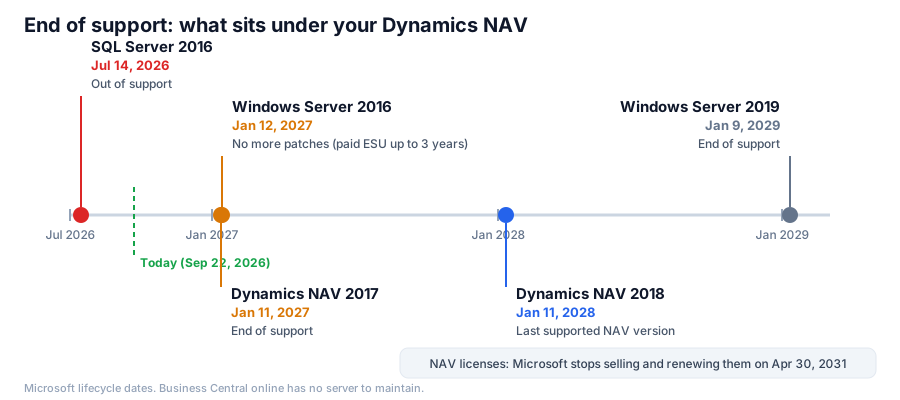
| Product | End of extended support | What it means |
|---|---|---|
| SQL Server 2016 | July 14, 2026 (already passed) | No security patches since then |
| Dynamics NAV 2017 | January 11, 2027 | No fixes or Microsoft support |
| Windows Server 2016 | January 12, 2027 | No patches unless you pay for ESU (up to three years) |
| Dynamics NAV 2018 | January 11, 2028 | Last supported NAV version |
| Windows Server 2019 | January 9, 2029 | Moving from 2016 to 2019 buys only two years |
| NAV licenses | April 30, 2031 | Microsoft stops selling and renewing |
NAV 2009, 2013 and 2015 have been out of support for years, and NAV 2016 lost its support on April 14, 2026. If you are on one of them, the server was the last component of your installation still receiving patches. In January it stops being one.
The two-question check
Ask whoever administers your server to answer this (it takes two minutes):
1. Which Windows Server does the NAV service tier run on? Visible under Settings > System > About on the server itself.
2. Which SQL Server version hosts the database? In SQL Server Management Studio, SELECT @@VERSION.
| Windows Server | SQL Server | Situation |
|---|---|---|
| 2016 or older | 2016 or older | Critical: both components unsupported by January 2027 |
| 2016 or older | 2017 or newer | High: the operating system loses patches in January |
| 2019 or newer | 2016 or older | High: the database is already unsupported |
| 2019 or newer | 2017 or newer | Low on the server side; check the NAV version |
And a third question almost nobody asks: which NAV version and cumulative update are you on? NAV 2018 supports newer Windows Server and SQL Server releases in its latest cumulative updates; NAV 2017 and earlier are not certified on them. That is what decides whether the "new server" option exists for you at all.
What really happens after the date
It helps to separate the fear from the fact:
- Nothing switches off. Windows Server 2016 will boot on January 13, 2027 and NAV will keep running.
- Patches do stop. Vulnerabilities discovered from then on stay open. Unsupported operating systems are a favorite target precisely because everyone knows they will not be fixed.
- Insurers do ask. 2026 cyber underwriting questionnaires include whether unsupported software runs in production. A yes can raise the premium or put the renewal at risk. Why an unsupported ERP is a renewal risk.
- Auditors and large customers ask too. More industrial customers require suppliers to confirm they run supported systems.
- The ecosystem narrows. Backup tools, antivirus, bank connectors and third-party add-ons stop certifying old versions.
The three options and what each one costs
Option 1: buy time with ESU. Microsoft offers Extended Security Updates for Windows Server 2016 for up to three years. They are paid and cover security patches only; if the server runs in Azure, the updates come at no extra cost. It is the sensible choice when the migration is already decided and you need a 12-18 month bridge, not as a permanent plan. For SQL Server 2016, which is already out of support, check separately which extended update program Microsoft offers for your edition and at what price.
Option 2: new server, same NAV. Reinstall NAV on Windows Server 2022 or 2025 with a current SQL Server. Only viable if your NAV version is certified on them (in practice, an updated NAV 2018). It costs Windows and SQL licenses, the hardware or virtual machine, and the hours to reinstall and test. It buys two or three more years and changes nothing about the system: still no Copilot, no agents, no automatic updates, and NAV 2018 reaches its own end in January 2028. The numbers for this option versus migrating.
Option 3: Business Central online. The server disappears: Microsoft runs, updates and patches the platform. The cost is the migration, $25,000-45,000 for a small company with few customizations and more for heavy C/AL, plus per-user licenses. In exchange, the spend on server, SQL, backups, ESU and admin hours goes to zero; you move to a platform with automatic patches, MFA sign-in and Microsoft-managed backups; and Copilot, the agents and the four Power BI apps come in, which is where the performance NAV will never deliver lives. NAV licenses with an active Enhancement Plan get the Bridge to Cloud 3 discount. If the deadline is tight, the migration can be split: standard first, customizations later, without stopping operations.
The decision is not "which is cheaper this year", nor even which costs less over five: it is which one makes you more and protects you better. That is why we built the five-year comparison: enter your figures (users, maintenance, server, hours keyed by hand, stock, days to collect) and it returns direct cost, estimated value and risk in a PDF you can take to management.
How we help you solve it
We run a free assessment of your installation: NAV version and cumulative update, Windows Server, SQL Server, customizations and integrations. Within a week you have a document with your risk level, the options genuinely available for your version and the indicative cost of each.
If the answer is "ESU and bridge", we set it up and support your NAV in the meantime, without pushing you to migrate early. If it is "new server", we do it with testing before anything changes. And if it is "Business Central", the migration runs in phases, and each part is invoiced only after you accept it.
FAQ
Will my NAV stop working on January 12, 2027? No. It keeps running. What stops is the protection: no more patches for the operating system, and none already for SQL Server 2016.
Can I install my NAV on Windows Server 2025? It depends on the version. An updated NAV 2018, yes; NAV 2017 and earlier are not certified and may fail. The free assessment confirms it before anything is touched. On NAV 2017? Both deadlines fall in the same week.
Is ESU a solution? It is a bridge of up to three years for the operating system, paid and security-only. It does not cover the NAV version, and SQL Server 2016 needs its own program, if one exists for your edition. It makes sense with a migration date already decided.
How long does a Business Central migration take if I start now? Three to nine months depending on customizations. Starting in the fall, a company with a lightly customized NAV can be in the cloud before summer 2027. Full migration guide.
What if I don't even know which version I have? More common than it sounds. Ask for the assessment: we find out with read access and without interrupting anything.
Free assessment · Evaluación gratuita
Tell us your current system and how many users you have. First reply within one working day. / Cuéntanos tu sistema actual y cuántos usuarios sois. Respondemos en un día laborable.
Want to know where you stand before January? Request the free assessment of your installation: two questions to your IT provider, one week, and a document you can show management and your insurer.
Bramvia in: Spain · United States · Mexico · United Kingdom · Ireland · Canada · Colombia · Argentina · Chile · Peru · Australia · New Zealand · South Africa · Philippines · Poland · MCP server · Safety stock calculator