
Bramvia — Business Central Experts
What Business Central does module by module, who it fits, what it costs in the US, how it compares with NetSuite and QuickBooks — and the company profiles we would tell to choose something else.
Short answer: Microsoft Dynamics 365 Business Central is Microsoft's cloud ERP for small and mid-sized companies (roughly 5 to 500 users). It brings finance, sales, purchasing, warehouse, projects and — in the Premium plan — manufacturing and service into one system. It is the successor to Dynamics NAV (Navision), integrates natively with Excel, Outlook, Teams and Power BI, and costs from $80 per full user per month in the US. More than 50,000 companies run it in the cloud. It is an excellent fit if you already live in the Microsoft ecosystem and your operation has outgrown spreadsheets or a basic invoicing tool; it is more than you need if you are a freelancer or a very small service business.
Sound familiar?
- You're outgrowing your current system and keep hearing about Business Central.
- You want to know, quickly, whether it fits a company your size.
- You've seen a demo, but not what it really costs or how long it takes.
- You'd rather hear the limits now than discover them mid-project.
If two or more ring true, this is written for you. At the end, we explain how we'd solve it.
What it does, in one table
| Area | What it covers |
|---|---|
| Finance | Ledger, cash and banks, fixed assets, multi-company, multi-currency, consolidation, VAT and tax reporting |
| Sales | Quotes, orders, shipments, invoices, customer pricing and discounts, basic CRM |
| Purchasing | Orders, receipts, vendor invoices, approvals, automatic posting |
| Warehouse | Multi-location, bins, lots and serial numbers, traceability, physical inventory |
| Projects | Budgets, time and cost posting, project invoicing |
| Manufacturing (Premium) | BOMs, production orders, planning (MRP), capacity |
| Service (Premium) | Service orders, contracts, technician scheduling |
| AI | Copilot included; autonomous agents (payables, sales orders) billed by consumption |
What it does not include: payroll (it integrates with external payroll software) and advanced CRM (Dynamics 365 Sales covers that, natively integrated).
Is it right for your company? Start here
Three questions answer it faster than any feature list:
- Do you run on Microsoft 365? If Excel, Outlook and Teams are where your company already works, Business Central multiplies that. If you are a Google Workspace company, the advantage narrows and NetSuite competes harder.
- Is your complexity operational or financial? Warehouses, lots, manufacturing, multiple entities → Business Central. Revenue recognition, SaaS billing, subscriptions out of the box → NetSuite has more depth.
- What are you outgrowing? QuickBooks and spreadsheets are the easiest moves. Dynamics NAV or GP are the most urgent, because support is ending.
Who it's for — and who it isn't
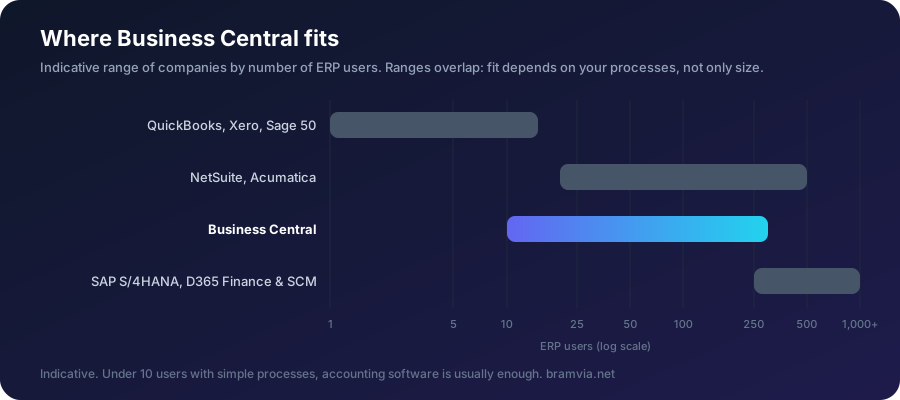
It fits you if: you have 5 to 500 users; you use Microsoft 365; your operation no longer fits in spreadsheets; you run a warehouse, purchasing, several legal entities or manufacturing; or you are on a NAV/Navision system that has run out of support.
It doesn't fit you if: you are a freelancer or micro-business with no stock; you need payroll inside the same system; or you are a multinational with thousands of users and highly complex processes (SAP S/4HANA plays there).
Navision, NAV and Business Central: the same family
Business Central is the direct evolution of Dynamics NAV, formerly Navision. Same business logic, rebuilt for the cloud. That is why NAV users adopt it quickly — and why migrating from NAV is the most natural path there is.
Cloud or on-premises
An on-premises version exists, but cloud (SaaS) is the default in 2026: no server to maintain, two updates a year included, backups, and the AI capabilities that only exist in the cloud. Full comparison.
What it costs
- Licenses: Essentials $80, Premium $110, Team Members $8 per user/month (US list prices; ~€69.30 / €95.30 / €6.90 in Europe). US cost breakdown.
- Implementation: a one-off project, from roughly $25,000 in the US for a small company with standard processes (from about €8,000 in Spain).
- Free: 30-day trial, external accountant license, Copilot, and four Power BI apps included.
The ecosystem: the advantage you don't see in a demo
What sets Business Central apart is everything around it: Excel connected live, Outlook showing the customer card inside the email, Teams for approvals, Power BI with four apps included, Power Automate for flows, and AppSource with thousands of extensions. Anything missing is built as clean AL extensions that survive updates.
The problems it actually solves
Nobody buys an ERP for its own sake. These are the problems companies bring to us, and what Business Central does about each:
| The problem | What Business Central does | Read more |
|---|---|---|
| The month-end close takes weeks | Bank reconciliation rules, recurring accruals, intercompany, financial reports built once | Month-end close |
| Nobody knows the margin by customer | Freight and duty loaded onto item cost, dimensions, Power BI included | Where the margin goes |
| Profitable, but short on cash | Cash flow forecast from receivables, payables, orders and POs | Cash flow forecast |
| Stock nobody trusts | Bins, barcode scanning, directed picking, cycle counting | Warehouse |
| Dead stock tying up cash | Item aging, reorder policies, safety stock from real lead times | Dead stock |
| Invoices keyed and matched by hand | E-documents, three-way match, the Payables Agent | Three-way match |
| Jobs finishing over budget | Job costing, production orders, standard vs actual variance | Job costing |
| Collections chased by email | Credit limits, reminder levels, automatic order blocks | Credit control |
What a typical project looks like
| Phase | Weeks | What happens |
|---|---|---|
| Assessment | 1 | Free: your current system, processes, integrations and a budget range |
| Design | 2-4 | Processes as they should work in Business Central, not copied from the old system |
| Build and migrate | 4-10 | Configuration, AL extensions, integrations, data cleansing and migration |
| Test | 2-3 | Your real documents: your month-end, your busiest day |
| Go-live and support | 2-4 | Cut-over at a period end, with the old system read-only as a fallback |
In total, 2-4 months coming from spreadsheets or entry-level software, 3-9 months migrating from another ERP. Each part is invoiced only after you accept it.
FAQ
Is Business Central the same as Dynamics 365? Dynamics 365 is Microsoft's family of business applications. Business Central is the SMB ERP within it (Finance & Supply Chain is the enterprise one).
How long does implementation take? From 2-4 months coming from spreadsheets to 3-9 months migrating from another ERP. Timeline by phase.
Do I need a partner? It is contracted and configured through a Microsoft partner. The 30-day trial you can start yourself.
How do I choose a partner? With these questions — and one piece of advice: insist on a contract split into parts with written acceptance criteria. We don't invoice any part until you accept it.
Free assessment · Evaluación gratuita
Tell us your current system and how many users you have. First reply within one working day. / Cuéntanos tu sistema actual y cuántos usuarios sois. Respondemos en un día laborable.
Wondering whether it fits your company? Tell us your size and current system, and we'll tell you honestly, including when it isn't the right choice. Free assessment.
Bramvia in: Spain · United States · Mexico · United Kingdom · Ireland · Canada · Colombia · Argentina · Chile · Peru · Australia · New Zealand · South Africa · Philippines · Poland · MCP server · Safety stock calculator